

Are you frustrated because your Ember Travel Mug isn’t charging? You rely on this smart mug to keep your drink at the perfect temperature, but now it won’t power up.
Don’t worry—you’re not alone, and this problem can be fixed. You’ll discover simple steps to get your Ember Travel Mug charging again. Keep reading to avoid wasting time and enjoy your hot coffee or tea without interruption.
Credit: www.ebay.com
Common Charging Issues
Charging issues with your Ember Travel Mug can be frustrating, especially when you rely on it to keep your drinks warm throughout the day. Understanding the common reasons behind these problems can save you time and unnecessary stress. Let’s look at some typical charging challenges and how you might spot them.
Power Source Problems
Sometimes the simplest issue is the culprit. If your Ember Travel Mug isn’t charging, check the power outlet first. A loose connection or a faulty socket can stop the charging process entirely.
Try plugging another device into the same outlet to verify if it’s working. Have you ever overlooked this basic step only to find out your power strip was switched off? It’s a quick fix that often gets missed.
Charger And Cable Damage
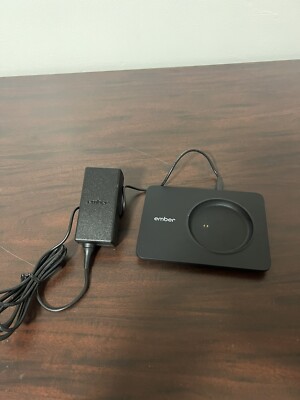
Inspect your charging cable and charger for signs of wear or damage. Bent connectors, frayed wires, or cracks can interrupt the power flow to your mug.
Even if the charger looks fine on the outside, internal damage can cause intermittent charging issues. Do you notice the charging light flickering or not turning on at all? That can indicate a faulty charger or cable needing replacement.
Battery Health Concerns
Over time, the battery inside your Ember Travel Mug may lose its ability to hold a charge. If your mug charges but drains quickly, this might be the problem.
Battery health depends on usage patterns and how often you charge the mug. Have you noticed your mug not lasting as long as it used to? It might be time to contact customer support or consider a battery replacement option.
Cleaning Charging Contacts
Cleaning the charging contacts on your Ember Travel Mug can solve many charging issues. Dirt, dust, and residue often build up on these small metal points, blocking the connection between the mug and its charger. Taking a few minutes to clean them properly might be the simple fix your mug needs to start charging again.
Tools Needed
- Soft microfiber cloth – gentle yet effective for cleaning
- Cotton swabs – for reaching tight spaces around contacts
- Isopropyl alcohol (at least 70%) – helps remove stubborn grime
- Toothpick or wooden stick – to carefully dislodge debris
- Compressed air can (optional) – blows away loose dust without touching
Step-by-step Cleaning Process
Start by unplugging your Ember Travel Mug charger from the power source to avoid any electrical risks. Use a microfiber cloth to wipe away any visible dirt or dust on the charging base and mug contacts.
Dip a cotton swab lightly in isopropyl alcohol, then gently clean the metal contacts on both the mug and charger. Avoid using too much liquid; you want it damp, not dripping. A toothpick can help remove any stuck particles, but be careful not to scratch the contacts.
If you have a compressed air can, use short bursts to blow away any remaining dust. Let everything dry completely for a few minutes before reconnecting the charger. Have you noticed how a quick clean can sometimes bring your mug back to life without any complicated fixes?
Resetting The Ember Mug
Resetting the Ember Travel Mug can fix charging problems quickly. This process clears minor glitches and refreshes the device. It helps the mug reconnect with its charger and app. There are two main types of resets to try. Each reset serves a different purpose. Choose the right one based on the issue you face.
Soft Reset Method
A soft reset restarts the Ember Mug without erasing settings. It is safe and simple. Follow these steps:
- Remove the mug from the charging coaster.
- Press and hold the power button for 10 seconds.
- Release the button when the LED turns off.
- Place the mug back on the charger to power it on.
This method often clears minor bugs. It restores normal charging and operation.
Factory Reset Instructions
A factory reset restores the mug to original settings. It deletes paired devices and custom settings. Use this if the soft reset fails. Follow these steps carefully:
- Ensure the mug is off and not on the charger.
- Press and hold the power button for 15 seconds.
- Release the button when the LED flashes red and white.
- Wait until the LED turns solid white.
- Set up the mug again using the Ember app.
Factory reset solves deep software issues. It makes the mug fresh, like new.
Updating Firmware
Updating the firmware on your Ember Travel Mug can fix charging problems. Firmware controls how the mug works with its app and hardware. Keeping it updated ensures smooth performance and proper charging. This process is simple and helps solve many common issues.
Checking For Updates
Open the Ember app on your smartphone. Connect your mug to the app via Bluetooth. Go to the settings or device section. Look for a firmware update notification. If an update is available, it will show here. Make sure your phone has a strong internet connection. Keep the mug close to your phone during this step.
Installing Firmware
Tap the update button in the app. The firmware will start downloading to your mug. Do not move the mug or close the app during installation. The process may take a few minutes. Your mug might restart automatically after updating. Check if the charging issue is resolved once done. Repeat the update process if needed.
Testing With Alternative Chargers
Testing with alternative chargers helps identify if the charging issue lies with your Ember Travel Mug or its power source. Using different charging equipment can isolate problems and save time. This approach ensures you do not buy unnecessary replacements. Testing is simple and effective. It highlights if the original charger is faulty or incompatible.
Using Different Power Adapters
Power adapters vary in voltage and current output. Using a different adapter can reveal if the Ember mug’s charger is the problem. Choose adapters with similar specs to the original one. Avoid adapters with too high or low voltage to prevent damage.
- Try a charger from another device with USB output.
- Use a wall adapter with at least 5V and 1A output.
- Observe if the Ember mug starts charging.
Using a different adapter may fix the charging issue immediately. It helps confirm if the original adapter is broken or incompatible.
Trying Another Usb Cable
USB cables can wear out or break inside without visible damage. Trying another USB cable is a quick way to check if the cable causes the problem. Use a cable compatible with your Ember Travel Mug’s charger port.
- Choose a cable with good quality and proper length.
- Connect the new cable to the original or different adapter.
- Check if the mug charges properly.
Replacing the cable often solves charging problems. It’s a low-cost and simple fix before seeking further help.

Credit: www.reddit.com
When To Contact Support
Knowing when to contact support for your Ember Travel Mug saves time and effort. Some charging issues need expert help. Others can be fixed at home. If simple fixes don’t work, reach out to support.
Support teams provide guidance on tricky problems. They know the product details well. Contacting them early can prevent further damage and frustration. Below are key points about warranty and repair options.
Warranty Information
Check the warranty status before contacting support. Ember Travel Mugs typically have a one-year warranty. This covers manufacturing defects and some malfunctions.
Keep your purchase receipt handy. It proves your mug is under warranty. Support may ask for it during the claim process.
Warranty does not cover damage from drops or misuse. If your mug stopped charging due to such issues, support might offer paid repairs.
Repair Or Replacement Options
Support can guide you through repair or replacement choices. They may provide troubleshooting steps first. If the mug is faulty, they might replace it.
Replacements usually depend on warranty status and issue type. Out-of-warranty mugs might need paid repairs. Support can give cost estimates.
Use official repair services to keep your mug safe. Unauthorized fixes can void the warranty. Support will help you find authorized centers.

Credit: www.walmart.com
Frequently Asked Questions
Why Is My Ember Travel Mug Not Charging?
Your Ember mug may not charge due to a dirty charging base or misaligned mug. Clean both surfaces and ensure the mug sits correctly on the charger for proper contact and power flow.
How Do I Reset An Ember Travel Mug?
To reset, hold the power button on the mug for 10 seconds until it turns off. Then, release and press again to restart the mug. This can fix minor charging and connectivity issues.
Can A Faulty Charger Cause Ember Mug Charging Issues?
Yes, a damaged or incompatible charger can prevent charging. Always use the original Ember charging base and cable to ensure proper voltage and connection for safe charging.
What Should I Do If Ember Mug Still Won’t Charge?
If cleaning and resetting don’t work, try using a different power outlet. If the problem persists, contact Ember customer support for warranty or repair options.
Conclusion
Experiencing charging issues with your Ember Travel Mug? Don’t worry. Simple solutions exist. Check the cable for damage. Ensure the base connection is clean. Sometimes, a reset resolves the problem. If issues persist, consider contacting Ember support. Reliable customer service can help.
Regular maintenance keeps your mug running smoothly. Keep your favorite drinks warm without hassle. Remember, a little care goes a long way. Enjoy your hot beverages anytime, anywhere. Your Ember Travel Mug should serve you well. Stay warm and enjoy!

Sophia Martinez is a culinary lifestyle writer and product reviewer for DiningGadgets.com. Passionate about blending style with functionality, she explores the latest dining essentials, kitchen décor, and cleaning hacks that transform everyday cooking spaces. With a background in home organization and design, Sophia brings readers expert advice on creating beautiful, practical kitchens that truly feel like the heart of the home.