

Designing a kitchen doesn’t have to be daunting. Free kitchen design software simplifies the process and sparks creativity.
Choosing the right tool can transform your vision into a practical plan. Various software options cater to different needs, whether you’re a DIY enthusiast or a professional planner. Sweet Home 3D offers user-friendly features for PC users, while DreamPlan excels in landscaping and home design.
Chief Architect Home Designer Architectural 2024 provides advanced tools for detailed projects. For those interested in detailed interior planning, Sweet Home 3D’s additional models and manual are ideal. Other tools like Home Designer Suite and Punch! Home & Landscape Design offer versatile design capabilities. These programs help create stunning, functional kitchens without overwhelming complexity. Explore these free options to start your kitchen design journey today.
Sweet Home 3d
![Sweet Home 3D [PC Download]](https://m.media-amazon.com/images/I/81mqySxP8uL._SL500_.png "Best Kitchen Design Software Free for Stunning Home Renovations 1")
Sweet Home 3D [PC Download] is an ideal choice for homeowners, interior designers, and DIY enthusiasts who want to create detailed floor plans and visualize home interiors with ease. If you are looking for an intuitive and powerful tool to design your living space without needing advanced technical skills, this software is perfect for you.
Pros:
- Easy-to-use interface suitable for beginners and professionals alike
- Allows detailed 2D floor plan creation and 3D visualization
- Supports importing additional 3D models for customization
- Free and open-source with an optional Plus edition for enhanced features
- Cross-platform compatibility with PC download option
Cons:
- Limited advanced rendering options compared to professional CAD software
- Some features are only available in the Plus edition
- May require time to master all functionalities for complex designs
Developed by Emmanuel Puybaret and published by eTeks, Sweet Home 3D offers a blend of simplicity and functionality. The software allows users to easily draw walls, add furniture, and customize colors and textures, making the design process both creative and efficient. Its interactive 3D view provides a realistic perspective, enabling users to walk through their designs virtually and make informed decisions about space and layout.
The Plus edition enhances the user experience by adding new features such as additional furniture libraries, improved import capabilities, and better export options. This makes Sweet Home 3D not only a great choice for personal projects but also a practical tool for professionals who need to present clear, visually appealing plans to clients. Overall, Sweet Home 3D [PC Download] combines accessibility with powerful design tools, making it a valuable asset for anyone looking to bring their home design ideas to life.
To buy this product, click here.
Dreamplan Home Design And Landscaping Software
![DreamPlan Home Design and Landscaping Software Free for Windows [PC Download]](https://m.media-amazon.com/images/I/51kvZH2dVLL._SL500_.jpg "Best Kitchen Design Software Free for Stunning Home Renovations 2")
The DreamPlan Home Design and Landscaping Software Free for Windows is ideal for homeowners, DIY enthusiasts, and aspiring interior designers who want to create detailed home and garden plans without professional help. This software is perfect for users seeking an easy-to-use yet powerful tool to visualize remodeling projects, landscaping ideas, or new home builds on their PC. Whether you’re planning a simple room makeover or designing an entire property, this software offers the flexibility to bring your ideas to life.
Pros:
- Intuitive interface suitable for beginners and casual users
- Comprehensive tools for home design, interior decoration, and landscaping
- Free download available for Windows PC, making it accessible
- Ability to create 3D models and walkthroughs for better visualization
- Supports detailed customization of rooms, furniture, and outdoor spaces
Cons:
- Limited advanced features compared to professional-grade software
- Occasional learning curve for users unfamiliar with design software
- Free version may have restrictions on saving or exporting projects
Developed by NCH Software, the DreamPlan Home Design and Landscaping Software offers a robust set of features that make home planning accessible to everyone. Users can easily sketch floor plans, design interiors with a wide selection of furniture and fixtures, and plan landscaping layouts including gardens, decks, and pools. The software’s 3D visualization allows users to virtually walk through their projects, helping them better understand spatial relationships and design aesthetics. This interactive approach helps prevent costly mistakes and inspires creativity.
Additionally, the software’s compatibility with Windows PC ensures smooth performance and accessibility for a wide audience. Its user-friendly design means that even those without prior experience in home design software can quickly learn to create detailed and personalized designs. While the free version provides ample tools for most users, those needing more advanced capabilities can consider upgrading. Overall, DreamPlan is a valuable tool for anyone looking to confidently plan and visualize their dream home or outdoor space.
To buy this product, click here.
Chief Architect Home Designer Architectural

The Chief Architect Home Designer Architectural 2024 is ideal for homeowners, DIY enthusiasts, and professional designers who want to create detailed and precise home designs with ease. Whether you are planning a renovation, building a new home, or simply experimenting with architectural ideas, this software offers powerful tools to bring your vision to life. Its user-friendly interface makes it accessible for both beginners and experienced users looking for comprehensive design capabilities.
Pros:
- Intuitive and easy-to-use interface for efficient home design.
- Advanced 3D modeling tools for realistic visualization.
- Comprehensive library of architectural elements and materials.
- Precise drafting and construction documentation features.
- Compatible with various operating systems and hardware specifications.
Cons:
- May have a learning curve for users new to architectural software.
- Requires a modern computer system for optimal performance.
- Price point might be higher compared to basic design tools.
The Chief Architect Home Designer Architectural 2024 stands out with its robust set of features designed to streamline the home design process. Users can create detailed floor plans, customize layouts, and add realistic textures and materials, enabling a highly personalized design experience. The software’s powerful 3D rendering capabilities allow users to visualize their projects from multiple angles, providing a clear understanding of spatial relationships and design aesthetics before construction begins.
Additionally, the software offers precise construction documentation tools that help users generate accurate blueprints and material lists, saving time and reducing errors during the building phase. Its extensive library of architectural components, including doors, windows, and roofing options, ensures that designs meet both functional and stylistic requirements. Overall, this software delivers a comprehensive solution for anyone serious about creating professional-grade home designs.
To buy this product, click here.
Home Designer Suite
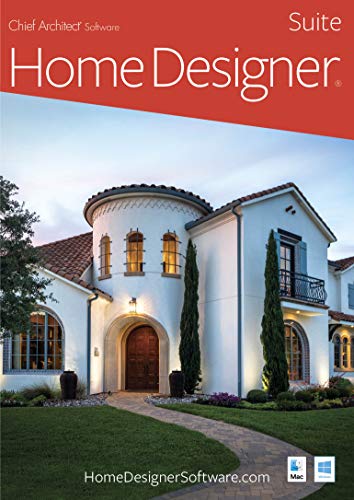
The Home Designer Suite – PC Download is ideal for homeowners, DIY enthusiasts, and interior designers looking to create detailed and professional home plans from the comfort of their computer. If you want an intuitive yet powerful software to visualize renovations, remodels, or new builds, this product offers a comprehensive solution tailored for both beginners and experienced users.
Pros:
- User-friendly interface that simplifies the design process for all skill levels
- Includes a wide range of customizable templates and objects for accurate home modeling
- Allows for detailed 3D visualization to better understand space and design choices
- Regular updates and support from the trusted brand Chief Architect
- Convenient PC download format for instant access without waiting for shipping
Cons:
- May require a learning curve for users new to home design software
- System requirements could be demanding on older PCs
- Some advanced features may be limited compared to professional-grade software
The Home Designer Suite offers an impressive array of features that enable users to create detailed floor plans, customize interior elements, and experiment with landscaping. Its powerful 3D rendering capabilities allow users to visualize their projects realistically, helping to make informed decisions before any physical work begins. This reduces costly mistakes and enhances the overall planning process.
Additionally, the software’s extensive library of design tools and objects ensures that users can tailor their projects precisely to their needs, whether it’s adjusting room dimensions, selecting materials, or visualizing furniture placement. Being a product from Chief Architect, it assures reliability and industry-standard quality, making it an excellent investment for those serious about home design.
To buy this product, click here.
Sweet Home 3d
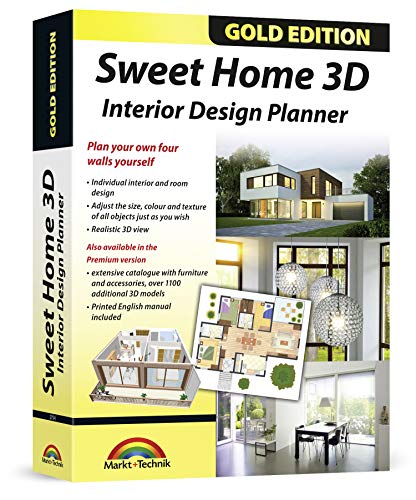
The Sweet Home 3D – Interior Design Planner is perfect for architects, interior designers, and planners who need a versatile and user-friendly software to create detailed home designs. If you are looking to visualize your interior projects with precision and ease, this product offers an ideal solution with its extensive library of models and compatibility with multiple operating systems.
Pros:
- Includes an additional 1100 3D models for enhanced design options
- Comes with a printed manual for easy guidance
- Compatible with a wide range of Windows versions including Windows 11, 10, 8, 7, Vista, XP and MAC
- Developed by the reputable Markt + Technik brand
- User-friendly interface suitable for both beginners and professionals
Cons:
- The software may require a learning curve for users unfamiliar with 3D design tools
- Some advanced features might be limited compared to high-end professional software
The Sweet Home 3D Interior Design Planner offers a comprehensive set of tools that enable users to create detailed floor plans and 3D visualizations. The inclusion of over 1100 additional 3D models significantly expands creative possibilities, allowing architects and planners to customize interiors with furniture, appliances, and decor elements. This extensive library helps users bring their design concepts to life more realistically, which is invaluable for client presentations and project planning.
Furthermore, the software’s compatibility across multiple operating systems ensures flexibility and accessibility for professionals working in diverse environments. The printed manual included serves as a helpful resource for users to quickly understand the features and maximize the software’s potential. Overall, this planner balances functionality and ease of use, making it an excellent choice for anyone involved in interior design or architectural planning.
To buy this product, click here.
Kitchen & Bath Design Presentation

Ideal for interior designers, kitchen and bath professionals, and students seeking to enhance their expertise in creating detailed design presentations, the Kitchen & Bath Design Presentation: Drawing, Plans, Digital Rendering is a valuable resource. This book is perfect for those who want to master the art of visualizing and communicating kitchen and bath layouts effectively using both traditional and digital techniques.
Pros:
- Comprehensive coverage of both drawing and digital rendering techniques.
- Includes clear, professional plans and presentation methods aligned with NKBA standards.
- Compact and practical size with 272 pages for in-depth learning.
- Published by Wiley, ensuring credible and high-quality content.
- Useful for both beginners and seasoned professionals looking to refine their presentation skills.
Cons:
- Publication date (2014) may mean some digital tools discussed are slightly outdated.
- Focused mainly on kitchen and bath design, limiting application to other interior design areas.
- Requires some prior knowledge of design basics to fully benefit from the material.
The book’s detailed approach to drawing, plans, and digital rendering equips users with the skills to produce professional-quality design presentations. It emphasizes practical techniques that comply with the NKBA Professional Resource Library standards, ensuring that layouts are both functional and visually appealing. The inclusion of digital rendering methods bridges traditional and modern design practices, enabling users to keep pace with evolving industry expectations.
With its carefully structured content, the resource also highlights the importance of clear communication in client presentations and project approvals. By mastering these visual presentation skills, professionals can enhance client satisfaction and streamline project workflows. Overall, this edition serves as a critical tool for anyone involved in kitchen and bath design who aims to deliver compelling, polished presentations.
To buy this product, click here.
Remodel Your Kitchen Without Going Bonkers Or Broke

Ideal for homeowners and DIY enthusiasts looking to remodel their kitchen efficiently without the stress of overspending or facing overwhelming decisions, Remodel Your Kitchen Without Going Bonkers or Broke is the perfect guide. This book is designed for anyone who wants a stress-free renovation experience while achieving the kitchen of their dreams.
Pros:
- Provides clear, step-by-step guidance on kitchen remodeling
- Helps manage renovation budgets to avoid overspending
- Offers practical tips to reduce stress during the renovation process
- Comprehensive content spread over 246 pages for in-depth understanding
- Compact and easy-to-handle dimensions for convenient reading
Cons:
- Publication date is from 2020, so some trends might be slightly outdated
- Not suited for those looking for highly technical or contractor-level details
This book, manufactured by Jim Molinelli LLC, combines practical advice with a user-friendly approach to help readers navigate the complexities of kitchen renovation. With its manageable size—9.0 inches in height, 0.56 inches in width, and 6.0 inches in length—it is designed for easy use during the planning and remodeling stages. The content focuses on balancing aesthetics and functionality while keeping budgets in check, making the renovation process less intimidating for first-timers.
Readers benefit from actionable strategies that emphasize stress reduction and smart spending, ensuring that their remodeling journey is both enjoyable and rewarding. By following the techniques outlined in this book, users can confidently transform their kitchens without feeling overwhelmed or financially stretched, ultimately achieving the stylish and functional kitchen they envision.
To buy this product, click here.
Home Designer Pro

The Home Designer Pro – PC Download is perfect for homeowners, professional designers, and architects looking to create detailed and customizable home plans with ease. If you want powerful yet user-friendly software to bring your architectural visions to life, this product is an ideal choice.
Pros:
- Advanced 3D design tools for realistic visualization
- Comprehensive library of materials, textures, and objects
- Easy-to-use interface suitable for both beginners and professionals
- Precise floor planning and remodeling features
- Manufacturer support by Chief Architect ensures reliability
Cons:
- Requires a powerful PC to run smoothly
- Steeper learning curve for users new to design software
- Higher price point compared to basic home design tools
Home Designer Pro offers a robust set of features that allow users to create detailed floor plans, interior designs, and landscaping layouts with precision. Its advanced 3D modeling capabilities enable users to visualize their projects in a realistic environment, facilitating better design decisions and client presentations. The extensive library of design elements makes customization easy and enhances creativity.
With its intuitive interface, Chief Architect’s Home Designer Pro balances complexity and usability, catering to both experienced designers and enthusiastic homeowners. The software’s ability to handle remodeling, cost estimation, and project management streamlines the entire design process, saving time and reducing errors. Overall, it is a comprehensive solution for anyone serious about home design and renovation projects.
To buy this product, click here.
Punch! Home & Landscape Design Premium V19
![Punch! Home & Landscape Design Premium v19 - Home Design Software for Windows PC [Download]](https://m.media-amazon.com/images/I/B1MRV7v76kS._SL500_.jpg "Best Kitchen Design Software Free for Stunning Home Renovations 9")
The Punch! Home & Landscape Design Premium v19 is ideal for homeowners, DIY enthusiasts, and professional designers who want to create detailed and customized home and landscape plans. This home design software is perfect for users looking to visualize remodeling projects, new builds, or outdoor enhancements with ease on their Windows PC. If you seek an intuitive yet powerful tool to bring your design ideas to life, this software suits your needs perfectly.
Pros:
- Comprehensive design tools for both home interiors and landscaping
- User-friendly interface suitable for beginners and advanced users
- Extensive library of customizable objects and materials
- High-quality 3D rendering for realistic project visualization
- Supports detailed floor planning with precise measurements
- Downloadable software for quick installation and use on Windows PC
Cons:
- Limited to Windows operating systems, no Mac support
- Premium edition may have a learning curve for complete novices
- Some advanced features may require additional time to master
The Punch! Home & Landscape Design Premium v19 offers a robust suite of features that enable users to design both interiors and outdoor spaces with professional-grade precision. Its extensive library of customizable objects allows for detailed personalization, helping users to match their exact vision. The software’s ability to render high-quality 3D visuals makes it easy to preview projects in a lifelike manner, reducing costly mistakes and improving communication with contractors or family members.
Designed to streamline the creative process, this home design software simplifies complex tasks such as floor planning, landscaping layout, and material selection. The intuitive interface ensures that even those new to design software can start creating impressive layouts quickly. By providing a downloadable format for Windows PCs, it ensures accessibility and convenience, making it an excellent choice for anyone serious about home and landscape design.
To buy this product, click here.
Virtual Architect Ultimate Home Design
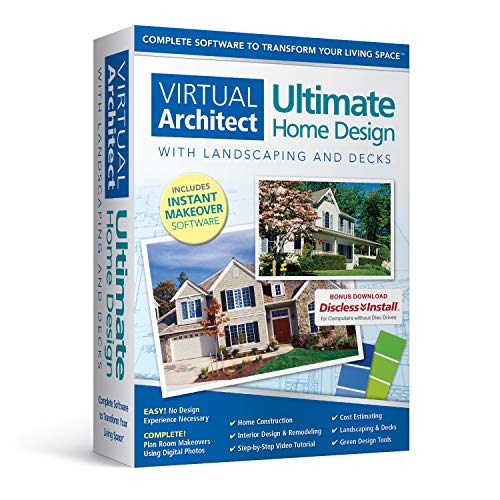
The Virtual Architect Ultimate Home Design with Landscaping and Decks is perfect for homeowners, DIY enthusiasts, and professional designers who want a comprehensive tool to create detailed home designs, including landscaping and deck layouts. If you are looking to visualize your dream home or outdoor space with ease and precision, this software is tailored for you.
Pros:
- Includes extensive design features for both interior and exterior projects
- User-friendly interface suitable for beginners and professionals alike
- Supports detailed landscaping and deck planning within the same software
- Offers realistic 3D renderings to visualize final designs
- Lightweight software with efficient performance (Weight: 1.75 pounds)
Cons:
- Limited color options (White, Black) for the software interface
- May require a learning curve for users unfamiliar with design software
Developed by Nova Development, the Virtual Architect Ultimate Home Design combines powerful features to provide a complete home design experience. Users can craft detailed floor plans, customize interior elements, and simultaneously plan landscaping and deck additions, all within one platform. This integration helps streamline the design process, eliminating the need to switch between multiple programs.
The software’s intuitive tools and realistic 3D visualization capabilities allow users to see their projects come to life before construction begins. This not only enhances creativity but also helps identify potential design flaws early. Whether you’re redesigning your garden or adding a new deck, the precise measurements and customizable templates ensure your project will fit perfectly within your property.
To buy this product, click here.
Frequently Asked Questions
What Is The Best Free Kitchen Design Software For Beginners?
Sweet Home 3D is ideal for beginners. It offers an easy interface and many 3D models. It’s free and compatible with Windows and Mac, perfect for simple kitchen designs.
Can I Use Dreamplan For Kitchen And Landscaping Design?
Yes, DreamPlan Home Design supports kitchen and landscaping designs. It’s free for Windows and user-friendly, allowing easy customization and 3D visualization of your kitchen and outdoor space.
How Does Chief Architect Home Designer 2024 Help Kitchen Projects?
Chief Architect Home Designer 2024 provides advanced tools for precise kitchen layouts. It offers detailed plans, 3D rendering, and professional-grade features ideal for serious home remodeling.
Is Sweet Home 3d Suitable For Professional Architects?
Sweet Home 3D with extra 1100 models and manuals is great for architects. It supports detailed interior planning, making it a valuable tool for professional kitchen design projects.
What Features Make Home Designer Suite Ideal For Kitchens?
Home Designer Suite offers comprehensive kitchen planning tools, including cabinet placement and appliance integration. It simplifies remodeling with intuitive design and detailed 3D previews.
Can Virtual Architect Ultimate Design Kitchens And Outdoor Decks?
Yes, Virtual Architect Ultimate includes kitchen design plus landscaping and deck options. It’s a versatile tool for complete home exterior and interior renovation projects.
Conclusion
Choosing the right kitchen design software can make your project easier and more fun. The free options like Sweet Home 3D and DreamPlan offer many useful tools without cost. These programs help you plan layouts, visualize ideas, and try different styles before building.
Some, like Chief Architect and Home Designer Suite, provide advanced features for detailed designs. Many support Windows and Mac, so you can use them on your preferred device. Using these tools saves time and reduces mistakes during renovation. Plus, seeing your kitchen in 3D helps you feel confident about your choices.
Whether you want simple planning or professional-level designs, there is a free option for you. Take your time to explore them and pick the one that fits your needs. Starting with free software is smart, especially if you want to design your kitchen without spending a lot.
Your dream kitchen is closer than you think.

Sophia Martinez is a culinary lifestyle writer and product reviewer for DiningGadgets.com. Passionate about blending style with functionality, she explores the latest dining essentials, kitchen décor, and cleaning hacks that transform everyday cooking spaces. With a background in home organization and design, Sophia brings readers expert advice on creating beautiful, practical kitchens that truly feel like the heart of the home.